The Best Mouse Sensitivity for Aim: Pro Values and a Calculator
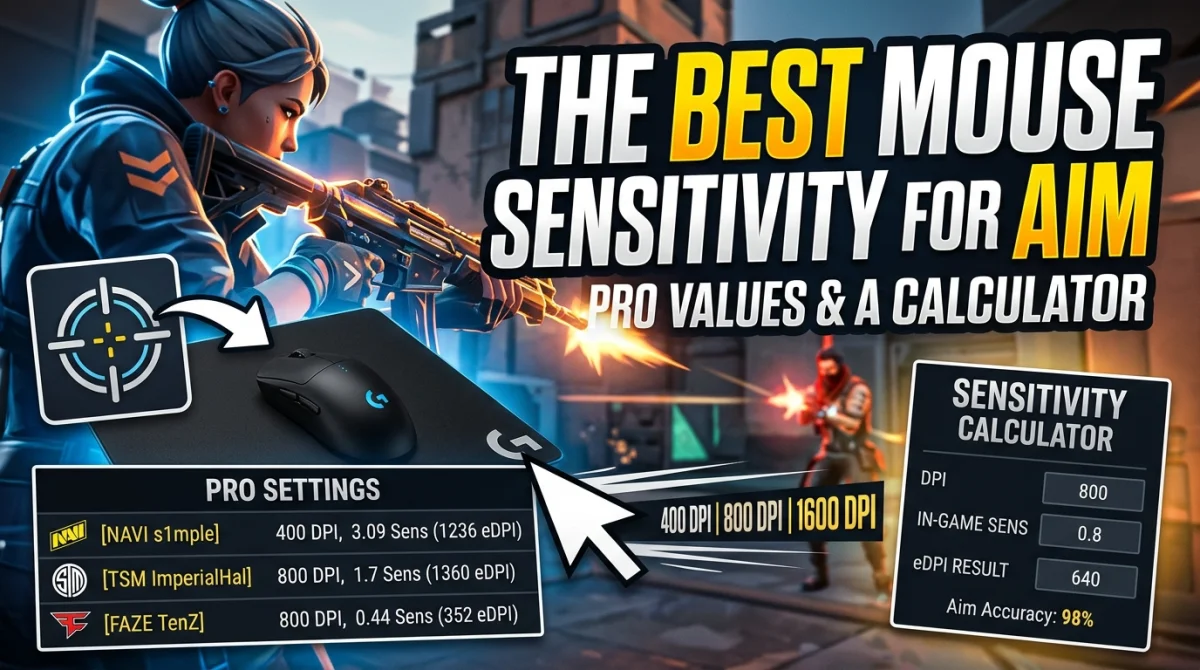
Aim is the skill everyone practices, but most players set their sensitivity once by feel and never touch it again. The gap between your aim and a pro's is often not talent, it is a number. This guide gives you the real sensitivity values professional players use in Valorant, CS2, Overwatch, and Apex Legends, explains eDPI so you can compare across different mouse DPIs, and includes a simple calculator formula to find your starting point. Five minutes with these numbers fixes the two biggest aim killers: sensitivity that is far too high and a DPI that fights your habits.
Most pros run an eDPI of 200 to 600 depending on the game: Valorant and CS2 sit near 200-400, Overwatch around 3000-5000, and Apex near 1000-2000. eDPI equals in-game sensitivity multiplied by mouse DPI. Start at 400 or 800 DPI, tune to land inside those ranges, then micro-adjust over a few sessions. Lower, stable values beat twitchy high settings, and identical physical distance should always feel identical.
Why Sensitivity Matters: The eDPI Concept
Your mouse DPI is how many pixels the cursor moves per inch of physical movement, but games apply their own sensitivity multiplier on top. That is why you cannot compare two players' raw sensitivity numbers directly. eDPI combines both into one comparable figure:
eDPI = in-game sensitivity x mouse DPI
A player at 800 DPI and 0.5 sensitivity has an eDPI of 400, identical to a player at 400 DPI and 1.0 sensitivity. They aim exactly the same at the mouse level. eDPI is the only fair way to compare settings across setups and games.
Pro Sensitivity Values by Game
| Game | Typical pro eDPI | Common mouse DPI | Typical in-game sens |
|---|---|---|---|
| Valorant | 200-400 | 400-800 | 0.3-0.6 |
| CS2 | 200-400 | 400-800 | 1.0-2.0 |
| Overwatch 2 | 3000-5000 | 800-1600 | 4.0-6.0 |
| Apex Legends | 1000-2000 | 800-1600 | 1.0-2.5 |
| Fortnite | 30-80 (ADS) | 400-800 | 0.05-0.15 |
The ranges are broad because arm aimers and wrist aimers genuinely differ, but the pattern holds: tactical shooters with precise, crosshair-focused fights run low sensitivity, while fast movement games run higher.
How to Find Your Perfect Sensitivity
Start at the Pro Baseline
Pick 400 or 800 DPI and set your in-game sensitivity so your eDPI lands inside the range for your game. For Valorant that is usually around 0.4 at 800 DPI. For CS2, try 1.5 at 400 DPI.
Test the 180-Degree Rule
In any first-person game, do a full 180-degree turn across your mouse pad. A smooth, single sweep from one edge to the other is about right. If you run out of pad, lower the sensitivity; if a 180 takes less than half the pad, raise it.
Micro-Adjust Over Sessions
Change sensitivity in small steps, 10-20% at a time, and play at least a few rounds before judging it. Give each setting a fair test, your muscle memory adapts faster than your expectations.
If aim still feels off after tuning, the problem may not be the number at all. The one setting 90% of players get wrong is often the real culprit, and on controller, dead zone settings hide the same kind of silent aim damage.
The Mouse Sensitivity Calculator
You can do the math in seconds without a website:
- Write down your current in-game sensitivity.
- Multiply it by your mouse DPI to get your eDPI.
- Compare that eDPI to the table above.
- Pick a target, then divide the target eDPI by your DPI to get the new in-game sensitivity.
Example: your Valorant sens is 0.6 at 800 DPI, so eDPI is 480. That is above the pro range. Dropping to 0.45 at 800 DPI gives an eDPI of 360, right in the middle of the table.
DPI, Polling Rate, and Mouse Hygiene
- Keep DPI between 400 and 1600. Extreme values add acceleration quirks on some sensors.
- Set polling rate to 1000 Hz so movement is sampled every 1 ms, and reduce input lag on the mouse side with a wired connection if needed.
- Turn off Enhance Pointer Precision in Windows. It applies mouse acceleration that changes the distance-to-cursor ratio depending on speed, which destroys consistent aim.
- Use a large mouse pad (450 x 400 mm or bigger) so low sensitivity is comfortable.
The Two Aim Settings Everyone Gets Wrong
Mouse acceleration is the first. It makes the same flick land differently depending on how fast you swipe, which is exactly the opposite of what you want for muscle memory. Turn it off in Windows and in game.
The second is changing sensitivity constantly. Jumping between values every match stops your muscle memory from ever forming. Pick one value, commit to it for a week, then adjust. For a full tour of the settings menus that secretly hurt your aim, check our settings new players should change first.
Key Takeaways
- eDPI = in-game sensitivity x DPI, the only fair comparison across setups.
- Pro Valorant and CS2 players sit around 200-400 eDPI; Overwatch and Apex run higher.
- Start at 400-800 DPI and tune in 10-20% steps over a few sessions.
- Turn off mouse acceleration and Enhance Pointer Precision.
- Commit to one setting for at least a week before judging it.
Frequently Asked Questions
What DPI should I use for gaming?
400, 800, or 1600 are the most common, with 800 a great starting point. Keep the same DPI and adjust in-game sensitivity instead of switching DPI between games.
Is low sensitivity better for aim?
Generally yes for tactical shooters. Lower sensitivity gives finer control over small corrections, which is why most Valorant and CS2 pros aim in the 200-400 eDPI range.
Does mouse DPI matter more than in-game sensitivity?
No. Only the combined eDPI matters. Doubling your DPI and halving your in-game sensitivity produces the exact same aim at the mouse level.
How long does it take to get used to a new sensitivity?
Most players adapt within a few hours to days. Give a new setting at least a full session or two before deciding, and never change it mid-ranked-match.
Conclusion
The best mouse sensitivity is not a mystery or a feel, it is a number. Start from the pro ranges, calculate your eDPI, and tune in small, committed steps with acceleration off. You will aim more consistently within a week because the settings no longer fight you. Do the math once, trust the process, and let your muscle memory catch up.
What sensitivity do you play on and what game? Drop it in the comments, share this guide with a teammate who is always changing settings, and subscribe for more aim and settings breakdowns.
Ready to play?
Puzzle, arcade, 3D, word & sports games for every age — instant play, no registration.
Comments
No comments yet. Be the first to share your thoughts!