Cloud Gaming vs Traditional Gaming: Pros and Cons
The Real Frustration Behind Your Next Gaming Setup
You have been eyeing that new AAA title for months. The trailers look incredible, the reviews are glowing, and your friends are already deep into the endgame. But then reality hits: your aging laptop wheezes at the menu screen, a console upgrade costs as much as a monthly rent payment, and building a gaming PC feels like learning a second language. You are stuck between two very different paths - cloud gaming and traditional gaming - and neither one feels like an obvious win.
This matters because the choice you make will shape not just what you play, but how you play, how much you spend, and whether gaming stays fun or becomes another source of tech anxiety. The good news? Both options have matured significantly. By the end of this guide, you will know exactly which path fits your life, your budget, and your gaming goals.
The Problem: Why Choosing Between Cloud and Traditional Gaming Feels Impossible
Here is what is actually happening. The gaming industry has split into two fundamentally different delivery models. Traditional gaming means you own the hardware - a console, a gaming PC, or a handheld device - and you run games locally. Cloud gaming streams the game to your screen from a remote server, much like Netflix streams a movie. The game runs on someone else's computer; your device is just the window.
This split matters because the "right" answer depends on variables most articles gloss over: your internet stability, your local electricity costs, how much you value ownership versus convenience, and whether you play competitive shooters or narrative-driven RPGs. The wrong choice leads to laggy sessions, wasted money, or a library of games you cannot access when you need them.
The people most affected are casual gamers on tight budgets, travelers who want to game on any screen, and competitive players who cannot afford a single frame of delay. The most common mistake? Treating cloud gaming as a replacement for traditional hardware rather than a complement to it. Another frequent error is assuming that a fast internet plan alone guarantees a smooth cloud experience, ignoring router placement, Wi-Fi congestion, and data caps.
Why This Dilemma Exists in the First Place
The tension between cloud and traditional gaming did not appear out of nowhere. It is the result of three converging forces.
First, hardware costs have spiraled. A mid-range gaming PC in 2026 can easily run past $1,200. Consoles, while cheaper upfront, lock you into ecosystems with expensive proprietary accessories and subscription fees. For many players, the barrier to entry has never been higher.
Second, internet infrastructure has finally caught up - in some places. Fiber and 5G home internet have made low-latency streaming viable for millions of households. Where 10 Mbps used to be "good enough," cloud gaming services now recommend 35-50 Mbps for 1080p and 100+ Mbps for 4K. In regions with solid infrastructure, the experience is genuinely impressive. In rural or bandwidth-capped areas, it remains frustrating.
Third, the industry itself is pushing toward services over products. Game publishers love recurring revenue. Cloud gaming feeds directly into that model: you pay monthly for access to a library rather than buying individual titles. This shift is not inherently bad, but it forces players to rethink what "owning a game" even means.
The Solutions: Breaking Down Both Approaches
Option 1: Traditional Gaming (Consoles & PC)
What it is: You purchase a physical or digital copy of a game and run it on hardware you own - a PlayStation, Xbox, Nintendo Switch, or custom-built PC.
How it works: The game executes locally. Your hardware renders every frame, processes every input, and stores every save file. You are in full control of the experience.
Advantages:
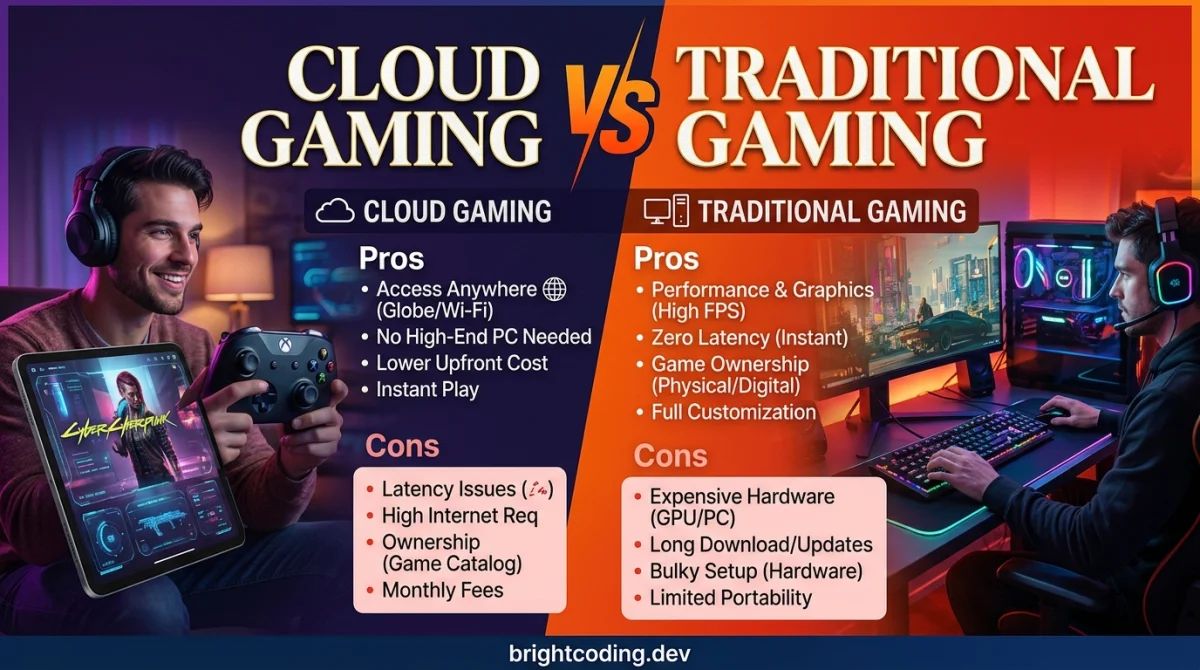
- Zero latency dependency. Once a game is installed, your internet connection does not matter. This is critical for competitive titles like Valorant, Street Fighter 6, or Call of Duty.
- True ownership (mostly). Physical discs and DRM-free digital copies remain playable even if a service shuts down.
- Modding and customization. PC gaming especially offers mods, graphical tweaks, and performance upgrades that cloud platforms simply cannot match.
- Offline play. Long flights, power outages with a UPS, or rural cabins - your games still work.
Disadvantages:
- High upfront cost. A console runs $400 - $500; a decent gaming PC starts around $800 and scales rapidly.
- Hardware obsolescence. Your rig will struggle with new releases within 4-6 years. Upgrading GPUs, RAM, or storage adds ongoing costs.
- Space and noise. A gaming PC takes up desk real estate and generates heat. Consoles need ventilation and shelf space.
- Portability limits. You cannot easily play your PC library on a phone during a commute.
When it makes sense: Traditional gaming is the clear winner for competitive players, modders, players in areas with unreliable internet, and anyone who wants full control over their library. If you plan to sink hundreds of hours into a single game, owning it locally pays off.
Costs to consider: Initial hardware ($400 - $2,000+), game purchases ($30 - $70 each), subscription services (PS Plus, Xbox Game Pass, etc.), and eventual upgrades.
Option 2: Cloud Gaming (GeForce Now, Xbox Cloud Gaming, Amazon Luna, etc.)
What it is: You stream games from powerful remote servers to almost any screen - a phone, tablet, laptop, TV, or even a browser window.
How it works: Your inputs travel to a data center, the server renders the game, and a video feed of the gameplay streams back to you. Your device is essentially a smart display with a controller attached.
Advantages:
- No expensive hardware required. A $200 Chromebook or even a smart TV can run Cyberpunk 2077 at max settings.
- Instant access, anywhere. Start a game on your TV at home, continue on your phone at a coffee shop. Your progress lives in the cloud.
- Try before you commit. Services like Xbox Cloud Gaming and GeForce Now let you test titles without downloading 100 GB install files.
- No storage anxiety. Modern games regularly exceed 150 GB. Cloud gaming removes that burden entirely.
Disadvantages:
- Latency is unavoidable. Even on excellent internet, cloud gaming adds 20-80 milliseconds of input lag. For rhythm games, fighting games, or competitive FPS titles, that delay is a dealbreaker.
- Internet dependency. A dropped connection means a frozen screen. Data caps can also be brutal - cloud gaming at 1080p uses roughly 10-15 GB per hour.
- Library restrictions. You do not own the games; you rent access. If a publisher pulls a title from the service, it vanishes.
- Visual compression. Even at high bitrates, streamed video cannot match the crispness of a locally rendered 4K image. Dark scenes and fast motion show artifacting.
When it makes sense: Cloud gaming shines for casual players, travelers, students on tight budgets, and anyone who wants to sample a wide variety of games without committing to hardware. It is also a fantastic way to test whether you actually enjoy a genre before investing in a full setup.
Costs to consider: Monthly subscriptions ($10 - $20), fast internet plan upgrades, and potential data overage fees from your ISP.
A Third Path: Hybrid Gaming
Many experienced players now use both models strategically. They maintain a traditional console or PC for their main competitive and single-player experiences, while using cloud gaming for travel, trying new releases, or playing on secondary screens. This approach maximizes flexibility without forcing an either/or decision.
If you want to experiment with browser-based gaming as a low-risk entry point, platforms like GamingUp offer over 193 free browser games that require zero downloads or registration. It is an ideal way to test whether a "no-hardware" gaming experience suits your taste before committing to a paid cloud subscription. They also host 58 free gaming tools - including aim trainers and performance calculators - that can help you benchmark your current setup and decide whether an upgrade is even necessary.
The Best Choice: Which Path Fits Your Situation?
There is no universal winner. The right answer depends on your specific circumstances.
Choose traditional gaming if:
- You play competitive multiplayer titles where every millisecond counts.
- Your internet is unreliable, slow, or data-capped.
- You value modding, graphical fidelity, and long-term ownership.
- You have the budget for upfront hardware costs.
Choose cloud gaming if:
- You want access to high-end gaming without buying a $1,000+ PC.
- You travel frequently or play across multiple devices.
- You prefer sampling many games over mastering one.
- You have stable, fast internet with no data caps.
Choose a hybrid approach if:
- You own a console or PC already but want flexibility on the go.
- You are unsure which model fits your lifestyle and want to test both.
Your Step-by-Step Action Plan
Ready to make a decision? Follow this checklist in order.
1. Audit your internet. Run a speed test at peak usage hours (evenings, weekends). You need at least 35 Mbps down for 1080p cloud gaming and a ping under 30 ms for playable latency. If your connection fails either test, traditional gaming is your safer bet.
2. Define your primary genres. List the top three game types you actually play. Competitive FPS, fighting games, and rhythm titles favor traditional hardware. Turn-based RPGs, strategy games, and narrative adventures work well on cloud platforms.
3. Set a realistic budget. Calculate the total cost of ownership over three years. A $500 console plus $120/year in online subscriptions totals $860. A cloud service at $15/month totals $540 - but only if you already own a compatible screen and controller. Factor in internet upgrades and data costs.
4. Test before you invest. Most cloud services offer free trials. Sign up, test your most-played genre, and pay attention to input lag and visual quality during busy hours. Simultaneously, visit GamingUp's free browser games to experience no-download gaming at its simplest.
5. Start with one ecosystem. Do not split your library across three platforms on day one. Pick one primary method, build a small library, and expand only when you are confident in your choice.
6. Reassess annually. Internet speeds improve. Hardware prices drop. Your gaming habits change. Revisit this decision every 12 months to ensure you are still on the optimal path.
Common Mistakes to Avoid
1. Ignoring your upload speed. Cloud gaming cares about download speed, but if you are streaming to a service or sharing bandwidth with a household, upload congestion causes stuttering. Test both.
2. Buying hardware for a game you will play for two weeks. The shiny new console syndrome is real. If you are unsure about your commitment, rent, borrow, or stream first.
3. Assuming Wi-Fi is good enough. Cloud gaming over Wi-Fi is playable, but ethernet is dramatically more stable. If you cannot run a cable, invest in a quality Wi-Fi 6E or Wi-Fi 7 router placed near your gaming spot.
4. Forgetting about data caps. Streaming at 4K can burn through a 1 TB monthly cap in under 70 hours. Check your ISP contract before going all-in on cloud gaming.
5. Neglecting controller compatibility. Not all cloud services support every controller. Verify that your existing gamepad works before subscribing.
6. Treating cloud gaming as a permanent replacement for ownership. If a service shuts down or a publisher removes a game, your progress may vanish. Keep local backups of saves when possible.
7. Overlooking free alternatives. Before spending a dime, explore free browser-based options and tools. GamingUp's collection of free gaming tools - including aim trainers and converters - can sharpen your skills without any subscription fee.
Expert Takeaway
The most important lesson is this: the best gaming setup is the one you actually use. A $3,000 gaming PC collects dust if your life only allows 30-minute phone sessions. A cloud subscription frustrates you if your internet drops every evening. Stop chasing the "best" technology and start matching your gaming method to your real habits, budget, and environment. The goal is to play more and troubleshoot less.
Frequently Asked Questions
Is cloud gaming better than traditional gaming for beginners? Cloud gaming is often better for beginners because it removes the hardware learning curve and upfront cost. You can start playing high-quality titles on devices you already own. However, if you live in an area with poor internet, a traditional console like a Nintendo Switch offers a more reliable first experience.
Can you play cloud games without a good PC? Yes - that is the entire point. Cloud gaming runs on remote servers, so your local device only needs to display a video stream. A basic laptop, tablet, or even a smart TV is sufficient. You do need a stable, fast internet connection and a compatible controller or mouse and keyboard.
What internet speed do I need for cloud gaming? For 1080p streaming, most services recommend 35-50 Mbps. For 4K, aim for 100 Mbps or higher. Equally important is your ping: under 30 ms is ideal, and anything over 60 ms will create noticeable input lag in fast-paced games.
Will cloud gaming replace consoles and PCs? Not in the near future. Cloud gaming excels at accessibility and convenience, but it cannot yet match the latency-free responsiveness, visual fidelity, and ownership model of traditional hardware. The two models will coexist, with cloud gaming serving as an entry point and traditional hardware remaining the choice for enthusiasts.
Is it worth paying for both a console and a cloud gaming subscription? For many players, yes. A hybrid approach lets you enjoy the best of both worlds: competitive and visually demanding games on local hardware, with the flexibility to stream casual titles or continue progress on a phone or laptop while traveling.
Ready to play?
Puzzle, arcade, 3D, word & sports games for every age — instant play, no registration.
Comments
No comments yet. Be the first to share your thoughts!